Guide
Mac video players ranked by memory usage 2026
Mac video player memory usage in 2026: what drives RAM in Stoic, VLC, IINA and QuickTime, and how to measure each on your own Mac in two minutes.
By Stoic · Updated November 3, 2026 · 7 min read
Mac video player memory usage depends on the decoder path, the file and the renderer, not on the player's name. No verified, dated benchmark of resident memory across players is available for this page, so it carries no ranking numbers. It gives you the ranking logic and the method to produce your own figures in two minutes.
- Mac video player memory usage is set by decode path, buffer depth and renderer, not by brand.
- Hardware decoding through VideoToolbox keeps frames in GPU-managed memory and keeps CPU load low.
- One decoded 4K 10-bit frame is about 25 MB, so buffer depth multiplies fast.
- Measure any player yourself in Activity Monitor on the same file; it takes two minutes.
- Stoic is built for local HDR and Dolby Vision files on Apple silicon; compare it against VLC and IINA on your own library.
Why this matters
Memory is the first thing people blame when a 4K HDR file stutters. It is rarely the real cause. Dropped frames come from decode, not from RAM, unless the system is swapping.
Still, a player that holds several hundred megabytes of frames for a single film makes your Mac less pleasant to use while it plays. That matters on a base-configuration Apple silicon Mac that shares one memory pool between the CPU and GPU. Stoic is a native player for local HDR and Dolby Vision files on those Macs, so memory behavior on heavy files is the case that matters here.
The short answer
No player wins on memory by default. The ranking follows three variables, and you can check each one yourself.
- Decode path. Hardware decoding through Apple's VideoToolbox is the efficient route on Apple silicon. Software decoding keeps more work, and more working memory, in the app's own process.
- Buffer depth. A player that queues more decoded frames ahead uses more memory in exchange for smoother seeking and fewer stalls.
- Renderer. A native renderer that hands HDR frames to the system display pipeline differs from one that converts frames itself.
Verdict: the player that uses hardware decoding, a shallow sensible buffer and a native renderer will sit lowest on your Mac. Confirm it on your own files rather than trusting a table of someone else's numbers.
Why a single memory figure misleads
Published memory comparisons usually report one number from one file on one Mac. That number changes with the file, the Mac and the moment you read it.
Three things move it more than the player does:
- The file's resolution, bit depth and codec.
- Whether the app was just opened or has played for an hour.
- Which column of Activity Monitor you read.
Take the arithmetic. A 4K frame is 3840 by 2160 pixels, which is 8,294,400 pixels. At 10-bit 4:2:0, stored in 16-bit containers, that is about 25 MB per decoded frame. Eight queued frames is about 200 MB before the app has loaded a single interface element. Buffer depth, not the logo on the dock icon, drives the difference.
Comparison: what drives memory in each player
This table compares the factors that decide memory use. It deliberately carries no megabyte figures, because none are sourced for this page.
| Player | Decode approach | Main memory driver | Best for |
|---|---|---|---|
| Stoic | Native Mac app built around VideoToolbox hardware decoding | Frame buffer for HDR and Dolby Vision files | Local MKV and HDR films on Apple silicon |
| VLC | Cross-platform engine with hardware decoding available | Cross-platform feature set, filters and buffering settings | Playing almost any format, free |
| IINA | Mac interface built on the mpv engine | mpv's cache and video output settings | Mac users who want mpv power with a native interface |
| QuickTime Player | Apple's own AVFoundation stack | System frameworks shared with the OS | Simple playback of formats Apple supports |
Honest read of the table: QuickTime Player is the lightest option when the file is a format it supports, but it does not open many MKV files. VLC and IINA open nearly everything, and their memory depends on settings you can change. Stoic targets one job, HDR and Dolby Vision from local files, so its memory cost is the cost of that job done natively.
High and low, by design rather than by number
The lowest expected footprint belongs to players that lean on system frameworks, because the OS shares that memory across apps. QuickTime Player sits there by construction. The highest expected footprints belong to players with deep caches and software filter chains, which VLC and mpv-based players can have when configured that way.
That is a structural statement, not a measurement. Treat it as a hypothesis to test in the next section.
Methodology
This page contains no measured benchmark. The comparison above rests on how each player is built, as described in each project's public documentation and on known properties of Apple's decoding frameworks, with the frame-size figure calculated from resolution and bit depth. Its limitation is plain: architecture predicts memory behavior, it does not replace a measurement on your file and your Mac.
Measure it yourself in two minutes
Use one file and one Mac so the comparison is fair.
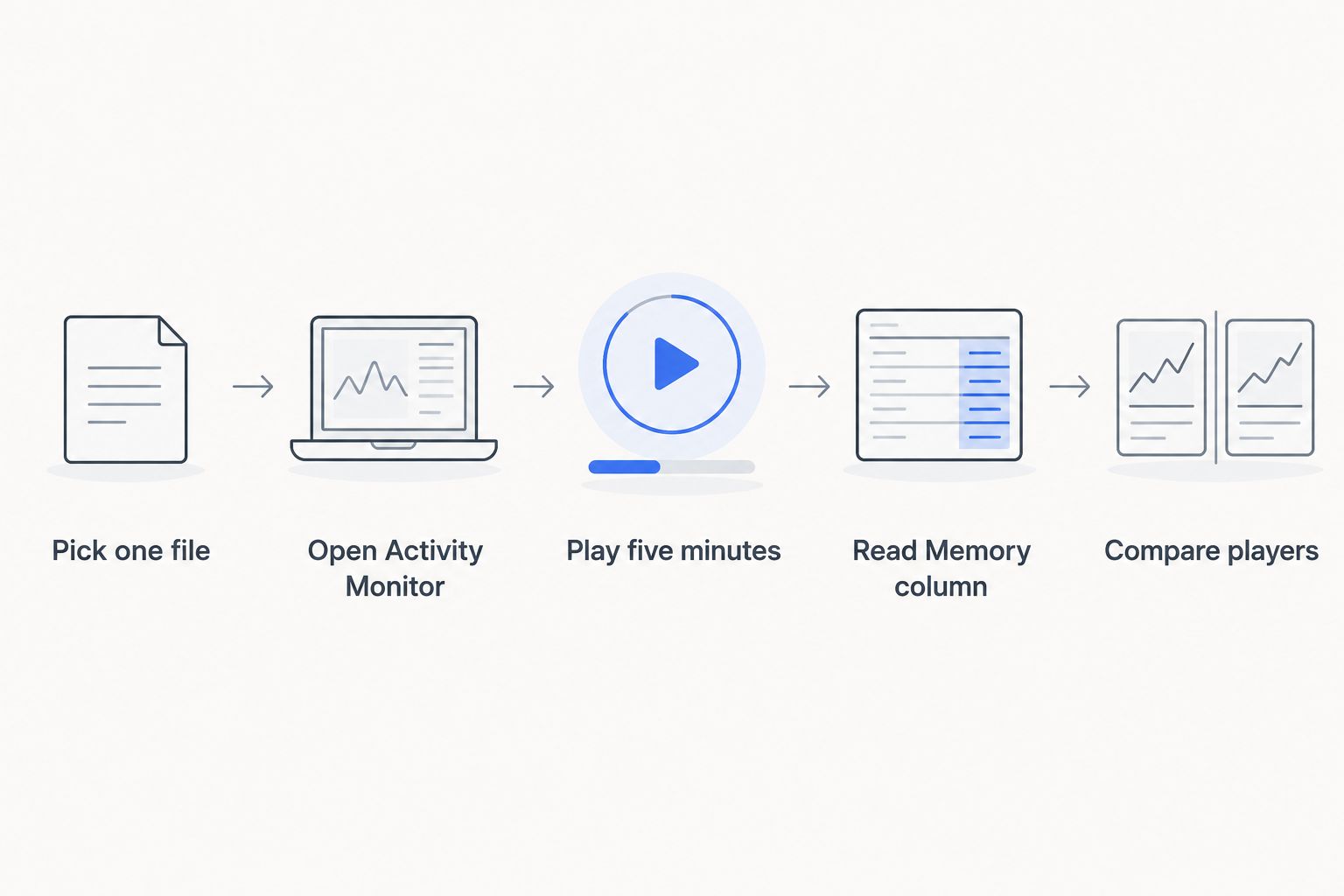
- Pick one 4K HDR file you actually watch. Use the same file for every player.
- Open Activity Monitor and switch to the Memory tab.
- Start playback and let it run for five minutes, so buffers reach steady state.
- Read the Memory column for the player's process, not Real Mem and not Compressed Mem in isolation.
- Note the Memory Pressure graph at the bottom. Green means the system is fine whatever the player's figure says.
- Quit the player, repeat with the next one, and write the numbers down.
Two cautions. Seek around the file once in each player, because seeking is where buffer depth shows up. And check dropped frames in the player's own statistics, since a low memory figure is worthless if frames drop.
How to use these findings
- If you watch HDR and Dolby Vision files, check picture correctness first and memory second. A player that is light but shows Profile 5 files in green and purple is not saving you anything. See the best HDR video players for Mac for the picture side.
- If your Mac has a small memory pool, prefer hardware decoding and lower cache settings, and watch the Memory Pressure graph.
- If you only play supported formats, QuickTime Player is the structural low-memory baseline.
- If you run several apps at once while watching, measure with those apps open, because shared memory pressure is what you feel.
Where Stoic fits
Stoic is a one-time purchase for Mac users who watch local files. Buy once. Yours to keep. It is built for native HDR and Dolby Vision playback on Apple silicon through VideoToolbox. Its weakness is scope: it is not a streaming client and not a tool for every exotic format. If you want one app that does everything for free, VLC is the honest answer.
What changes in 2026
Apple silicon is now the baseline for new Macs, so the question in 2026 is less about raw RAM and more about how a player uses the shared pool. Hardware decode support through VideoToolbox is the standard route in 2026, and the 4K 10-bit frame size has not changed. If you are choosing a player in 2026, run the test above once and keep the numbers.
FAQ
Which Mac video player uses the least memory in 2026?
QuickTime Player is structurally the lightest for formats it supports, because it shares Apple's system frameworks. For MKV and HDR files, measure your candidates on the same file in Activity Monitor.
How do I check video player memory usage on a Mac?
Open Activity Monitor, choose the Memory tab and read the Memory column for the player's process during playback. Also watch the Memory Pressure graph, which shows whether the system is actually short of memory.
How much memory does one 4K video frame use?
A decoded 4K 10-bit 4:2:0 frame is about 25 MB when stored in 16-bit containers. A player that queues several frames ahead multiplies that figure.
Does high memory usage cause dropped frames?
Rarely. Dropped frames usually come from slow decoding or rendering. Memory only causes them when the system starts swapping, which the Memory Pressure graph shows in yellow or red.
Is VLC heavy on memory on a Mac?
It depends on settings and the file. VLC supports many filters and cache options, so its footprint varies. Measure it on your own file instead of relying on a single published number.
Is IINA lighter than VLC?
Not by rule. IINA uses the mpv engine, and its memory follows mpv's cache and video output settings. Run both on the same file and compare.
Does hardware decoding reduce memory use?
It usually lowers CPU load and keeps decoding in dedicated hardware. Memory still depends on how many frames the player buffers, so check the Memory column rather than assuming.
One last thing
Watch the Memory Pressure graph, not the biggest number in the list. A player showing a large figure on a Mac with green pressure is doing nothing wrong, and a small figure beside a yellow graph means something else is eating your memory.