Guide
Best video players for Mac for anime fans in 2026
Best video player for Mac anime: IINA wins for styled subtitles. Compare HDR playback, track controls, and setup trade-offs to choose your player.
By Stoic · Updated November 3, 2026 · 10 min read
Best overall: IINA for subtitle-heavy anime on macOS. Best for HDR movie nights: Stoicplayer on Apple silicon; best for playback customization: mpv; best for a familiar cross-platform player: VLC. This 2026 guide separates subtitle rendering, file compatibility, and HDR playback so you can choose for the files you actually watch.
- For the best video player for Mac anime searches, choose IINA for subtitle-heavy local playback.
- Stoicplayer is the HDR video player pick for Apple silicon Mac users watching local HDR and Dolby Vision films.
- Choose mpv for detailed playback configuration; choose VLC for a familiar cross-platform interface.
- Check ASS subtitles, audio tracks, and seeking with a representative episode before committing to a player.
Why this matters
An anime episode can open correctly and still play incorrectly. Dialogue appears, but a translated sign lands over a character’s face. The picture moves, but the selected audio track does not match your subtitles.
Anime makes these differences visible because a release can combine styled subtitles, embedded fonts, multiple audio tracks, and chapter markers inside one MKV file. HDR adds a separate question: whether the playback chain presents the picture correctly.
For anime in 2026, choose by subtitle behavior first unless your library specifically needs HDR or Dolby Vision. A player that handles your films well is not automatically the right choice for elaborate fansub typesetting.
What makes the best video player for Mac anime playback?
- Subtitle fidelity: ASS and SSA subtitles can include positioning, fonts, outlines, and animation. Preserving that styling matters for translated signs and overlapping dialogue.
- Track control: You need clear access to embedded subtitles and alternate audio, plus a way to correct timing when the tracks do not align.
- File compatibility: MKV is a container, not a video codec. Opening the container does not settle whether every stream inside plays correctly.
- Picture handling: SDR, HDR, and Dolby Vision are different playback requirements. A file extension does not identify the picture pipeline.
- Everyday control: Seeking, chapter selection, keyboard shortcuts, and playlists affect every viewing session. Configuration effort belongs in the decision too.
Mac anime players at a glance
The 2026 shortlist gives each player a separate job. There is no useful universal winner across subtitle-heavy episodes, HDR films, and deeply customized playback.
| Player | Best for | Standout feature | Key limitation |
|---|---|---|---|
| Stoicplayer | Local HDR and Dolby Vision films on Apple silicon | Native Mac HDR and Dolby Vision playback focus | Not the recommendation here for advanced ASS typesetting |
| IINA | Everyday anime with styled subtitles | Mac interface built around mpv playback | Detailed playback changes can require advanced settings |
| mpv | Users who want precise playback configuration | Configuration files, scripting, and subtitle controls | Minimal interface requires more setup knowledge |
| VLC | A familiar player across operating systems | Broad local media support and visible track menus | Complex subtitle layouts need checking against the release |
1. Stoicplayer: best Mac anime player for HDR films
Stoicplayer is a native HDR and Dolby Vision video player for Mac users watching local files on Apple silicon. Its role in this list is specific: anime films and other local movies where HDR presentation drives the choice.
Stoicplayer is best for Apple silicon Mac users whose anime movie library needs native HDR and Dolby Vision playback. That is a narrower recommendation than best for every anime release, and a more useful one.
Where the HDR pick fits
Choose this category when the file is actually HDR or Dolby Vision. A regular SDR episode does not acquire HDR information because you open it in an HDR-focused player.
Your display matters too. Playing an HDR file and displaying HDR highlights are separate parts of the chain. Check the file, the player, and the screen rather than treating the app name as the whole answer.
For a picture-first comparison, the guide to Mac video players with HDR support addresses that separate decision.
Stoicplayer pros:
- Explicit focus on native HDR and Dolby Vision video playback.
- Built for the Apple silicon Mac audience described here.
- Local-file use matches a downloaded movie library.
Stoicplayer cons:
- The Apple silicon Mac focus does not suit a cross-platform viewing setup.
- HDR capability alone does not establish support for a release’s advanced subtitle effects.
Best for: Apple silicon owners choosing a player for local HDR anime films rather than primarily for subtitle customization.
Verdict: Buy for the HDR movie use case; choose a subtitle-first player when typesetting is the deciding factor.
2. IINA: best Mac anime player for everyday subtitles
IINA is a macOS video player built around mpv. It combines a Mac-oriented interface with playback technology that supports ASS subtitle rendering through libass.
That makes IINA the default recommendation for anime in 2026. You get a conventional application interface without starting with configuration files, while retaining access to the playback controls that local anime libraries need.
Why IINA is the default
Styled subtitles are more than dialogue at the bottom of the frame. An ASS track can place a translation beside a sign, distinguish speakers through styling, or coordinate text with an opening sequence.
IINA is a sensible starting point for those releases because its playback foundation is suited to styled subtitles. Still, inspect a representative episode. A missing font or an intentional subtitle override can change the result even when the player supports the format.
You should also distinguish the application from its playback engine. Familiar controls make daily use easier; they do not remove the need to understand an unusual file or a complicated setting.
IINA pros:
- Mac-oriented interface for routine local playback.
- ASS subtitle rendering through its mpv foundation.
- Access to audio tracks, subtitle tracks, and playback controls.
- A practical middle ground between simple controls and detailed configuration.
IINA cons:
- Advanced playback adjustments require more knowledge than ordinary playback.
- Subtitle font and style overrides can change the intended appearance.
- It is a macOS choice, not a shared interface across different operating systems.
Best for: Mac users watching episodic anime with styled subtitles who want an everyday application rather than a configuration project.
Verdict: Buy into IINA as the default workflow; customize only when a specific file gives you a reason.
3. mpv: best Mac anime player for custom playback control
mpv is a media player with a minimal interface and extensive configuration options. It supports ASS subtitles through libass, along with configuration files and scripting for users who want to define playback behavior themselves.
Choose mpv when you want explicit control over subtitle preferences, keyboard bindings, and playback settings. Do not choose it merely because a configuration guide promises a better picture.
When configuration earns its place
A repeatable configuration is useful when you know what you want. You can define preferences instead of making the same menu changes each time you open a file.
The cost is responsibility. A subtitle override can remove the release’s intended styling, and an old setting can remain active long after you forget why you added it.
For a 2026 setup, begin with default playback. Add a setting only when you can name the problem it solves and compare the result with that setting disabled.
mpv pros:
- Detailed control over playback and subtitle behavior.
- Configuration files make chosen preferences repeatable.
- Scripting supports workflows beyond standard player menus.
- A minimal interface keeps the video central.
mpv cons:
- Configuration syntax creates a learning curve.
- Troubleshooting custom settings takes more effort than using defaults.
- The minimal interface is less approachable for viewers who prefer visible menus.
Best for: Experienced viewers who want to own their playback configuration and understand the settings they change.
Verdict: Buy into mpv only if configuration is part of what you want, not an obstacle to movie night.
4. VLC: best Mac anime player for cross-platform familiarity
VLC is a cross-platform media player with support for many local video formats, audio tracks, and subtitles. It is a practical choice when you already know its menus from another operating system.
That familiarity is its distinct advantage here. For anime, judge the actual subtitle layout before making VLC your only player.
Where VLC fits
Straightforward dialogue subtitles and complicated sign translations are different tests. Confirm that simultaneous lines remain readable, signs retain their placement, and the intended fonts appear.
VLC supports ASS subtitles, but format support is not a guarantee that every release’s styling will match another renderer. Compare a difficult scene rather than rejecting or approving the player from the first line of dialogue.
VLC pros:
- Familiar application available across operating systems.
- Broad support for local media formats.
- Visible menus for selecting audio and subtitle tracks.
VLC cons:
- Elaborate subtitle layouts deserve a release-specific check.
- Its interface is less specifically Mac-oriented than IINA’s.
Best for: Viewers who value a familiar cross-platform application and whose anime files pass a subtitle check.
Verdict: Hold as a familiar fallback; make it your default only after checking representative releases.
Check an episode before choosing your player
Use the same local file in each candidate. Comparing different releases tells you little about the player because the video, fonts, audio, and subtitle scripts can all differ.
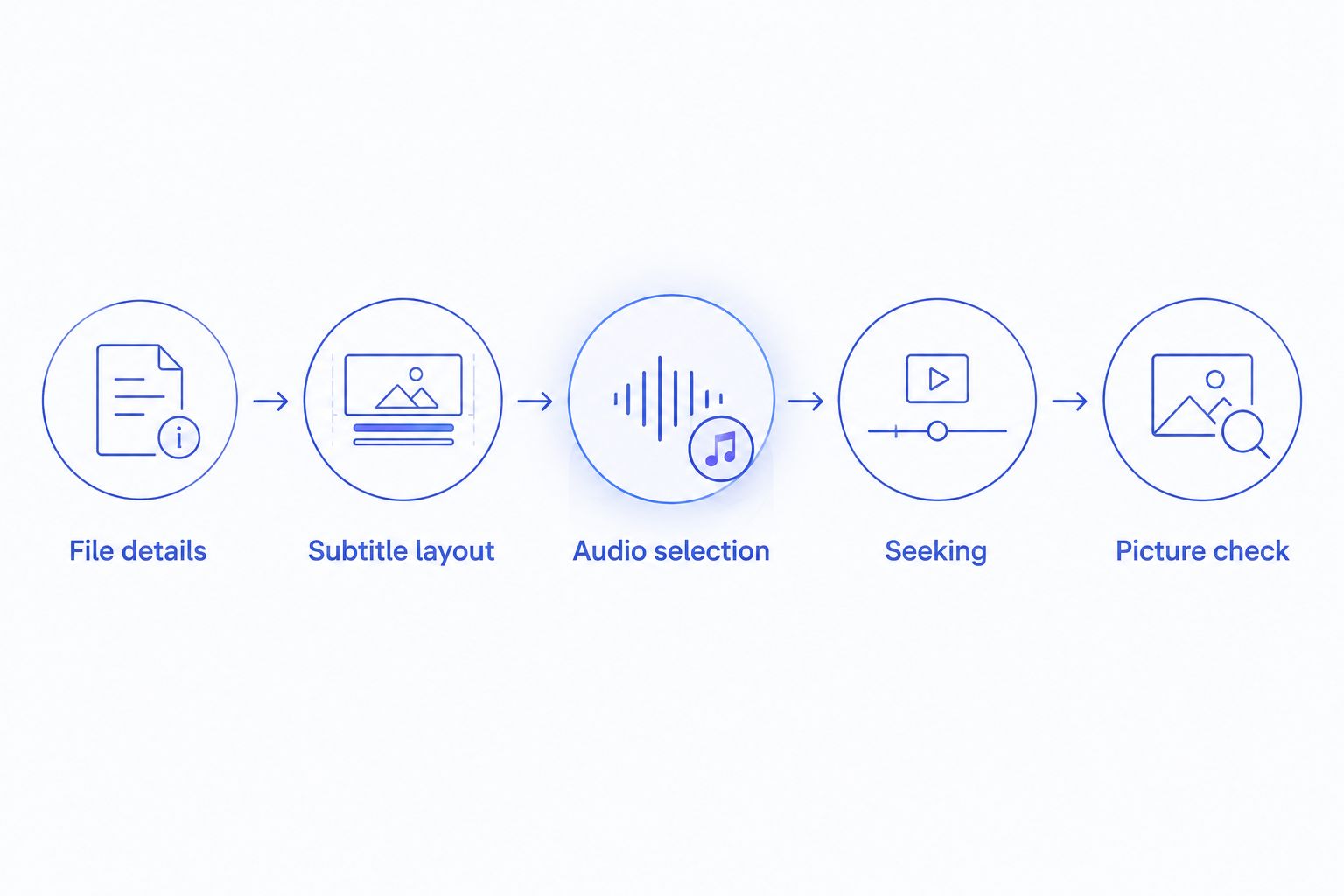
Work through these checks in order:
- File details: Identify the video codec, subtitle format, and whether the picture is SDR, HDR, or Dolby Vision. MKV alone answers none of those questions.
- Subtitle layout: Find dialogue overlapping a sign or another speaker. Check positioning, missing characters, outlines, and fonts.
- Audio selection: Switch between the embedded audio tracks and confirm which subtitle track accompanies your preferred language.
- Seeking: Jump between chapters and seek backward during dialogue. Confirm that subtitles and sound return in sync.
- Picture check: Compare the same scene without changing display settings. Investigate unexpected color changes separately from subtitle problems.
Do not judge motion or color from an isolated screenshot. A screenshot cannot show audio synchronization, seeking behavior, or whether subtitles animate correctly during playback.
Bit depth is not an HDR label
A 10-bit video channel represents 1,024 possible code values; an 8-bit channel represents 256. Those numbers describe encoding precision, not a promise of HDR brightness or better subtitle rendering.
A 10-bit anime encode can be SDR. Keep bit depth, color signaling, and Dolby Vision identification separate when diagnosing the picture. Choosing an HDR-focused player solely because a filename says 10-bit answers the wrong question.
How the players are ranked
This 2026 ranking prioritizes subtitle fidelity and everyday control for episodic anime, then separates HDR playback, configuration depth, and cross-platform familiarity into distinct recommendations.
IINA gets the default slot because its Mac interface and mpv foundation fit subtitle-heavy viewing. The other picks address different needs, not lower positions on a single picture-quality scoreboard. No claimed frame-rate advantage or measured performance result determines this order.
Which Mac anime player should you choose?
Choose IINA if you are undecided. Start with default settings, select the correct tracks, and check a subtitle-heavy scene before changing anything.
Choose the HDR pick for local HDR and Dolby Vision films on Apple silicon. Choose mpv when you want configuration files and scripting. Keep VLC when familiarity matters and your releases render correctly.
Your 2026 default should be the player that handles your library with the fewest corrective steps. Keep a second player for diagnosis, not for an endless settings contest.
FAQ
What’s the best video player for Mac anime in 2026?
IINA is the default recommendation for subtitle-heavy anime on Mac. Its Mac-oriented interface and mpv playback foundation fit everyday local viewing with styled subtitles.
Is IINA better than VLC for anime subtitles?
IINA is the stronger starting recommendation when styled ASS subtitles drive your choice. Compare a scene with signs and overlapping dialogue in both players before deciding for a particular release.
Which player should I choose for HDR anime movies?
Stoicplayer is the HDR video player recommendation for Apple silicon Mac users watching local HDR and Dolby Vision films. Evaluate subtitle requirements separately when a release uses elaborate typesetting.
Does a 10-bit anime file need an HDR player?
No. A 10-bit file can contain SDR video, so bit depth alone does not identify HDR. Check the file’s color information rather than relying on its filename.
Why do my anime subtitles look different in another player?
Subtitle rendering, fonts, and style overrides can change the appearance. ASS tracks can carry positioning and styling that ordinary text subtitles do not, so check the selected track and any overrides.
Does MKV support multiple audio and subtitle tracks?
Yes. MKV can contain multiple audio and subtitle tracks, though an individual file does not necessarily include them. Use the player’s track controls to inspect what your file contains.
Should I use mpv instead of IINA for anime?
Choose mpv when you want direct configuration and scripting; choose IINA when you prefer a Mac application interface. Both use mpv playback technology, so the decision is about workflow rather than an automatic quality upgrade.
One last thing
Before replacing a player, check whether you selected a full-dialogue subtitle track or a signs-only track. Signs-only subtitles translate on-screen text and selected material rather than every spoken line. A quiet subtitle track is not necessarily broken playback.