Guide
Best video players for Mac with Dolby Atmos audio support 2026
Best video player for Mac Dolby Atmos: Apple TV wins for supported streaming. Compare local players and check your soundtrack, Mac and audio output.
By Stoic · Updated November 3, 2026 · 9 min read
Best for supported streaming: Apple TV. Best for local-file compatibility: VLC. Best for a Mac-focused local-player interface: IINA. For Dolby Atmos in 2026, choose the playback route first: opening an Atmos-labelled file is not proof that you are hearing Atmos.
- For the best video player for mac dolby atmos, Apple TV wins for supported streaming, not arbitrary local files.
- VLC and IINA suit local MKV playback; decoding audio does not establish Dolby Atmos output.
- Stoicplayer targets native HDR and Dolby Vision playback on Apple silicon Macs; assess Atmos separately.
- Match the soundtrack, application, Mac and audio output before choosing a player.
Why this matters
Dolby Atmos describes an audio experience, not a file extension. A player can open an MKV, show the picture correctly and produce sound without preserving the Atmos information in its soundtrack. Sound is not the same as confirmation.
Stoicplayer is the HDR-focused choice for Apple silicon Mac users watching local films; its picture capabilities are not evidence of Atmos output. Dolby Vision concerns the image. Dolby Atmos concerns the sound.
For your 2026 setup, separate those decisions. Choose a player that handles your video, then establish what happens to the audio through your actual speakers, headphones or receiver.
What makes the best Mac video player for Dolby Atmos?
Judge players against these criteria before comparing interfaces:
- Source compatibility: Does the application accept your local file or provide access to your streaming title?
- Atmos handling: Does the application support Atmos through your intended output, rather than merely decode the underlying audio?
- Output compatibility: Does the Mac, connection and listening device support the selected playback route?
- Video handling: Does the player correctly display your SDR, HDR or Dolby Vision material?
- Playback controls: Can you select the right soundtrack, manage subtitles and correct synchronization problems?
- Verification: Can you distinguish Atmos playback from ordinary surround decoding, stereo output or an added spatial effect?
The best player is the one with a supported end-to-end path, not the longest codec list. Keep that rule beside any feature comparison you read in 2026.
Mac video players at a glance
This ranking separates supported streaming from local-file playback. The local-player entries are recommendations for their stated use cases, not a claim that every application delivers Atmos from every soundtrack.
| Player | Best for | Standout feature | Key limitation |
|---|---|---|---|
| Apple TV | Supported streaming with Atmos | Atmos playback for supported content and compatible setups | Not a general-purpose MKV library player |
| VLC | Broad local-file compatibility | Playback of many containers and audio formats | Successful audio decoding does not establish Atmos output |
| IINA | A Mac-focused local-player interface | Native-style controls built around mpv playback | Audio behavior depends on the playback engine and output configuration |
| Stoicplayer | Local HDR and Dolby Vision films on Apple silicon | Native HDR and Dolby Vision focus | Do not select it for Atmos on the strength of its video features |
1. Apple TV: best Mac video player for supported Atmos streaming
Apple TV is the strongest starting point when your film comes through Apple's supported playback environment. Apple documents Dolby Atmos playback on compatible Mac and audio setups. You still need a title and listening route that support it.
That makes Apple TV a different proposition from a local-file player. You are choosing a supported content-and-device path, rather than asking an application to interpret an arbitrary movie file.
Apple TV pros:
- Supports Dolby Atmos playback within compatible Apple playback setups.
- Keeps supported films and their playback experience within the same application.
- Provides a direct starting point for viewers already watching through Apple's services.
Apple TV cons:
- Does not replace a general-purpose player for an MKV collection.
- Atmos depends on the content, Mac and audio output, not just the application name.
- A title's Atmos label does not establish compatibility with every connected device.
Best for: You watch supported streaming content and want to follow Apple's documented audio requirements.
Before settling in, check the title's audio information and Apple's current requirements for your Mac and listening device. Do not assume that an external speaker connection behaves like supported headphones or the Mac's built-in speakers.
Verdict: Buy into this playback route for supported streaming; skip it as a universal local-file solution.
2. VLC: best Mac video player for broad local-file compatibility
VLC is a practical starting point for a folder full of different video files. Its broad format support makes it useful for establishing whether a file opens, whether the soundtrack plays and whether the problem is specific to another application.
That is a compatibility advantage, not an Atmos guarantee. Decoding a Dolby-family audio track into playable sound does not, by itself, prove that the Atmos presentation survives the output path.
VLC pros:
- Handles a broad range of local video containers and codecs.
- Provides audio-track and subtitle selection controls.
- Serves as a useful comparison player when troubleshooting a troublesome file.
VLC cons:
- An audible soundtrack is not confirmation of Atmos playback.
- Audio-output settings require attention when external equipment is involved.
- Broad file support does not establish correct HDR or Dolby Vision rendering for every source.
Best for: You need dependable access to varied local files and are prepared to verify audio behavior separately.
For a local movie library in 2026, start by confirming the selected track. A file can contain commentary, alternate languages and different mixes. The player cannot deliver the intended presentation if you select the wrong soundtrack.
Then inspect the listening path. If your receiver reports ordinary multichannel PCM, that readout alone is not evidence that Atmos metadata reached it. Do not confuse speaker activity with object-based playback.
Verdict: Buy into VLC for local-file compatibility; hold any Atmos conclusion until the output is verified.
3. IINA: best Mac video player for a Mac-focused local interface
IINA pairs a Mac-focused interface with the mpv playback engine. It suits viewers who want local-file controls that feel at home on macOS, including soundtrack and subtitle selection.
Its interface and its audio capabilities are separate considerations. A preference setting, a recognized codec or a spatial-sounding result does not independently establish native Atmos playback.
IINA pros:
- Provides a Mac-focused interface for local video playback.
- Builds on mpv's local-media playback capabilities.
- Offers practical controls for choosing tracks and managing subtitles.
IINA cons:
- Atmos conclusions require checking the underlying playback and output path.
- Advanced configuration adds complexity without proving audio compatibility.
- A clean interface does not resolve limitations elsewhere in the audio chain.
Best for: You prioritize the everyday experience of watching local files on a Mac.
Compare IINA and VLC using the same file, soundtrack and output device. Otherwise, a change in audio routing can masquerade as a player improvement. Keep the comparison controlled.
For 2026, treat IINA as a local-player choice first. Choose it because the controls suit your movie nights, then assess whether your particular audio route meets your Atmos requirement.
Verdict: Buy into IINA for its Mac-focused interface; hold the Atmos recommendation until your route is confirmed.
4. Stoicplayer: best Mac video player for an HDR-first shortlist
This application's stated focus is native HDR and Dolby Vision playback for local video files on Apple silicon Macs. It is sold as a one-time purchase and targets viewers watching material such as MKV files and HDR movies.
That makes it relevant when the picture is your first concern. It does not turn a video-format capability into an audio-format promise.
Stoicplayer pros:
- Focuses on native HDR and Dolby Vision video playback.
- Targets local-film viewing on Apple silicon Macs.
- Uses a one-time-purchase model.
Stoicplayer cons:
- Its stated HDR and Dolby Vision capabilities do not establish Atmos output.
- Its stated audience is Apple silicon Mac users; do not extend that positioning to other hardware.
Best for: You are choosing a local HDR movie player and will evaluate the audio path independently.
If your current problem is a washed-out image or incorrect Dolby Vision colours, an audio-led ranking will not settle the right question. Separate picture compatibility from soundtrack compatibility before choosing.
Verdict: Hold an Atmos-led purchase decision; shortlist this application for its stated HDR and Dolby Vision purpose.
Check the audio path before choosing
In 2026, the useful question is not simply whether an application supports a codec. Ask what reaches your ears through your particular setup.
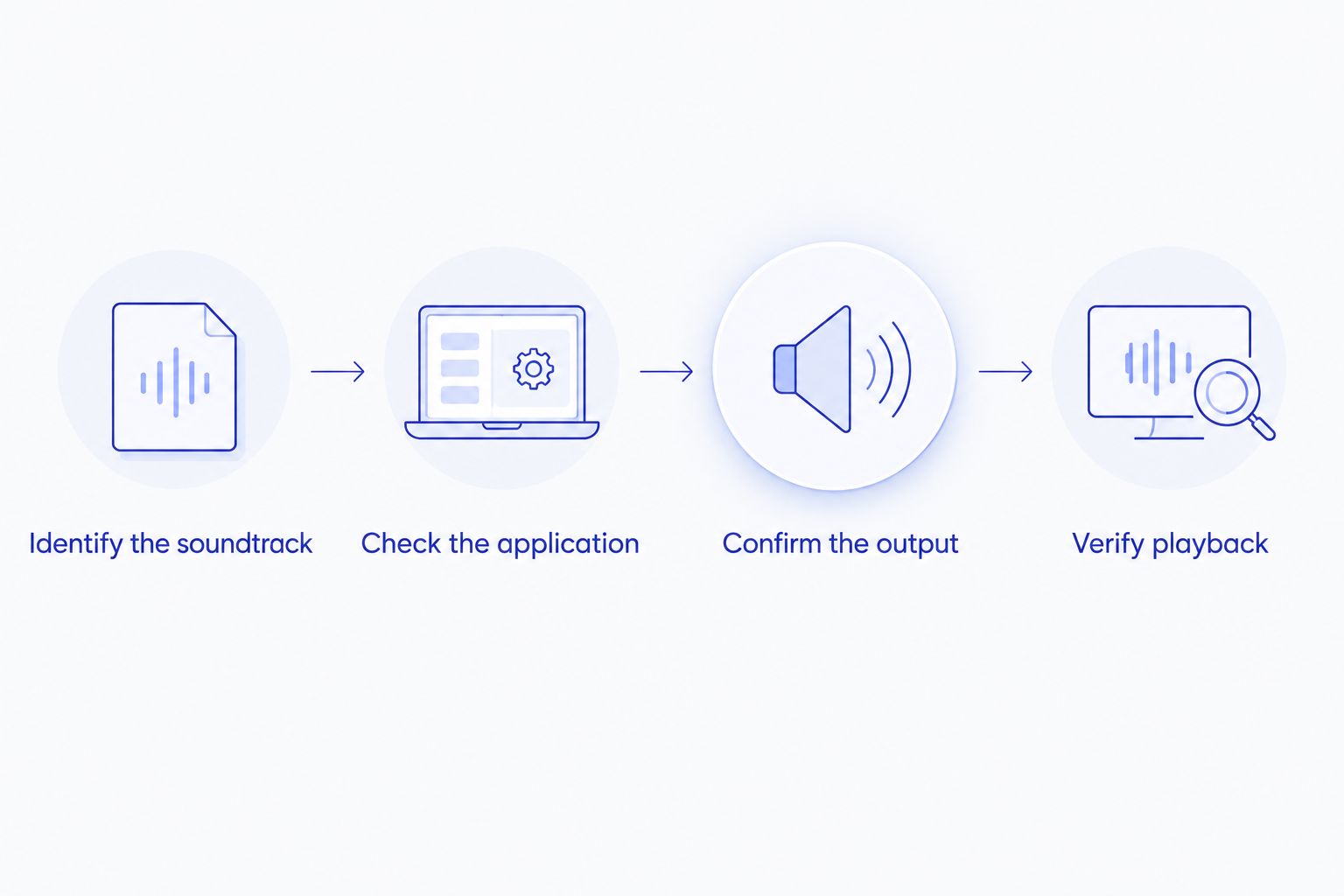
Identify the soundtrack
Inspect the file's audio information with a media-information utility. Dolby Digital Plus and Dolby TrueHD are different audio formats that can carry Atmos; the format name alone does not prove that a particular track includes it.
A 5.1-channel label and a 7.1-channel label describe channel layouts. Neither label, by itself, confirms Atmos metadata. A 2-channel output readout likewise describes the output channels, not a complete account of any headphone spatial rendering.
Check the application
Distinguish decoding, passthrough and spatial rendering. Decoding turns compressed audio into samples. Passthrough sends an encoded stream onward for compatible equipment to decode. Spatial rendering produces a listening presentation for a particular speaker or headphone arrangement.
These are different operations. Support for one does not establish support for the others.
Confirm the output
Check the exact output device and connection against current manufacturer documentation. Built-in speakers, supported headphones and an HDMI-connected receiver are different routes. Do not transfer an Atmos claim from one route to another.
Verify playback
Use the application's documented playback information or the receiving device's status display where available. Keep the source and settings unchanged while comparing players. Your ears can identify a problem; they cannot read metadata.
How this ranking works
The ranking prioritizes a supported Atmos use case, then separates local-player recommendations by file compatibility, interface and picture focus. It is not a measured sound-quality contest.
Apple TV takes the streaming position because it has a documented Atmos playback route. The remaining applications fill distinct local-viewing needs. No local player earns an Atmos endorsement here merely because it opens the file.
Which Mac video player should you choose?
Choose Apple TV for supported Atmos streaming. Choose VLC for broad local-file compatibility or IINA for a Mac-focused local interface. For local HDR films, assess picture handling separately from audio output.
If Atmos from local files is your deciding requirement, stop at the audio-path checklist before making a purchase. A player that solves the picture but not the required soundtrack route solves only half your movie night.
FAQ
What's the best video player for Dolby Atmos on a Mac in 2026?
Apple TV is the strongest starting point for supported Atmos streaming on a compatible Mac and audio setup. For local files, verify the soundtrack, application and output route before treating any player as an Atmos solution.
Does VLC playing an Atmos file mean I am hearing Atmos?
No. VLC producing sound confirms audio playback, not necessarily preservation or rendering of Atmos information. Check the output route and the receiving device's playback information where available.
Is IINA better than VLC for Dolby Atmos?
Neither interface preference nor successful file playback establishes better Atmos support. Compare the same soundtrack through the same output route and use documented playback behavior rather than subjective spaciousness.
Are Dolby Vision and Dolby Atmos the same thing?
No. Dolby Vision concerns video, while Dolby Atmos concerns audio. A player supporting one does not automatically support the other.
Does a 7.1-channel soundtrack guarantee Dolby Atmos?
No. A 7.1-channel description identifies a channel layout, not the presence of Atmos metadata. Inspect the specific soundtrack rather than relying on its channel count.
Can I use Apple TV to replace my MKV player?
Apple TV is not a general-purpose replacement for a local MKV player. Choose it for its supported content environment, and choose a local-file application for an MKV collection.
What should I check before buying a Mac player for Atmos?
Check the source audio format, the application's documented handling and the exact output device. Confirm that the supported route matches your setup rather than a different Mac, connection or listening device.
One last thing
A soundtrack that sounds wider is not necessarily Atmos. Spatial processing can change the presentation of ordinary audio, while genuine Atmos support still depends on the playback route.
Keep a short note of the file, selected track, application and output device when troubleshooting. Change one part at a time. The good scene deserves more than a convincing label.