Guide
Best Paid Media Player for macOS in 2026: 4 Worth Considering
Find the best paid media player for macOS: compare Stoicplayer, Infuse Pro, Elmedia and Movist Pro for HDR, local movies, subtitles and lifetime value.
By Stoic · Updated November 3, 2026 · 9 min read
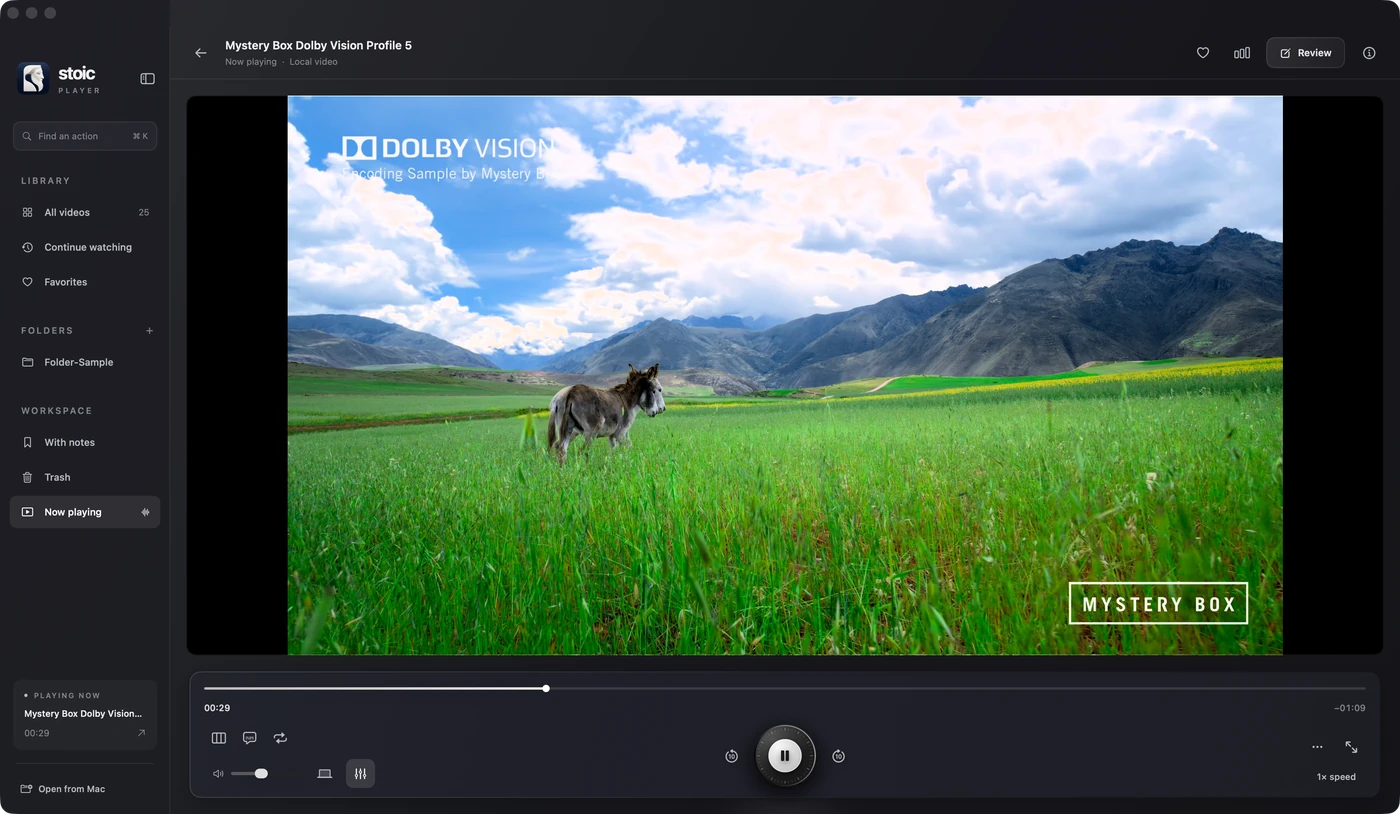
Best for local HDR movies: Stoicplayer. Best for an Apple-wide media library: Infuse Pro. Best for casting from your Mac: Elmedia Player PRO. Best for detailed subtitle control: Movist Pro. This 2026 guide compares what you actually get when you pay, with local movie playback as the starting point.
Disclosure: this guide is published by the maker of Stoicplayer. Recommendations reflect documented features and the use cases below, not an independent four-player laboratory test. Features were checked against official product pages on November 3, 2026.
Why paying for a player should solve a real problem
A paid media player should fix something you notice. Perhaps a Dolby Vision movie has the wrong colours. Perhaps your library lives on several devices, or you want subtitles positioned precisely without covering the picture.
Opening a file is only the beginning. The best purchase is the player that handles your particular file, display and viewing routine without making you work around them. In 2026, those differences are more useful than a long list of supported extensions.
What makes the best paid media player for macOS?
These are the criteria behind the recommendations:
- Correct picture: Explicit HDR and Dolby Vision support, rather than treating every playable file as equivalent.
- Mac compatibility: Support for your processor and installed macOS release.
- Source fit: Local files, shared storage, cloud libraries or casting, depending on where you watch.
- Subtitle control: Track selection, timing and readable positioning.
- Useful playback tools: Hardware decoding, file inspection, frame capture and navigation.
- Ownership: A payment model and licence scope you understand before checkout.
No player wins every category. A beautifully organised television library and a carefully rendered local movie are different jobs.
Paid Mac media players at a glance
| Player | Best for | Standout feature | Payment approach | Key limitation |
|---|---|---|---|---|
| Stoicplayer | Local HDR and Dolby Vision movies | Profiles 5 and 8.1, display-aware HDR and playback inspection | $14.99 lifetime; 40% off with BLACKFRIDAY | Apple silicon and macOS 26 or later only |
| Infuse Pro | Libraries across Apple devices | Library artwork, network sources and playback syncing | Monthly, yearly or lifetime options | More library infrastructure than a simple file-opening workflow needs |
| Elmedia Player PRO | Casting from a Mac to a TV | AirPlay, Google Cast and DLNA streaming | Paid upgrade for advanced features | Local playback alone does not necessarily justify the upgrade |
| Movist Pro | Subtitle-heavy viewing | Multiple subtitle tracks, positioning and subtitle speech | Paid Pro application | Several overlapping track and playback settings to configure |
The table is a decision tree, not a claim that every reader should buy the first entry. Start with the row that describes your evenings.
1. Stoicplayer: best for local HDR and Dolby Vision on Mac
Stoicplayer is the best paid media player for macOS here if you watch local HDR movies on a compatible Apple silicon Mac and want a one-time purchase. Its clearest advantage is the combination: explicit Dolby Vision processing, display-aware HDR output and tools that tell you what the player is doing.
The published feature set includes Dolby Vision Profiles 5 and 8.1, HDR10+, HDR10 and HLG. Metal and VideoToolbox provide a Mac-native rendering and decoding path. You can inspect the codec, colour information, decoder and dropped frames instead of guessing why a scene looks wrong.
That is the reason this player leads the guide. The offer makes the decision easier; it is not the entire argument.
Correct colour matters more than opening the file
A movie can open, move and produce sound while still showing the wrong picture. Stoicplayer's published September 23, 2026 comparison illustrates that distinction with a Dolby Vision Profile 5 sample.
On the reported M1 Pro MacBook Pro, the tested Stoic 0.2 beta rendered the sample with correct colour, while Elmedia 8.24 showed a colour cast. That is a version-specific, vendor-run result on one file, not proof that every competing build fails or that every movie behaves identically.
Infuse also documents Dolby Vision support. The recommendation is not based on pretending that HDR capability belongs to only one application.
More than a picture engine
The everyday tools are practical. A 10-band equalizer includes a Dialogue preset. Dual subtitles let you display two languages together, with timing adjustments when a track falls behind.
Frame stepping, A–B loops, timestamped notes and clip export make it easier to return to a scene. Picture in Picture keeps a small window alongside other work. Private folders support Touch ID, while the library and review notes stay local.
These features suit someone who both watches films and occasionally looks closer. You do not need to build a multi-device media system to use them.
Pros
- Explicit support for Dolby Vision Profiles 5 and 8.1 and multiple HDR formats.
- Media inspection and playback measurements help diagnose the actual file.
- Dual subtitles, dialogue adjustment and frame-based review tools.
- One lifetime purchase covers up to three personal Macs; updates are included.
Cons
- Intel Macs and macOS releases earlier than 26 are not supported.
- The product is Mac-focused; choose a different workflow for a shared Apple TV and iPhone library.
- Coupon purchases are excluded from the voluntary refund offer, subject to applicable consumer law.
Lifetime price and BLACKFRIDAY offer
The current lifetime price supplied for this guide is $14.99. Enter BLACKFRIDAY at checkout for 40% off. Applying that discount gives $8.994, which rounds to $8.99 before any applicable tax. Confirm the final amount before paying.
No promotion end date has been announced in this guide. Do not assume the coupon will remain available indefinitely, or that it stacks with other offers.
One important detail: the published refund policy excludes purchases using any coupon from the voluntary 24-hour refund offer. Read that condition before choosing the discounted purchase; statutory consumer rights are unaffected.
Best for: Film lovers watching local MKV, HDR and Dolby Vision files on a supported Mac.
Verdict: Buy if local HDR playback is the job you need solved.
2. Infuse Pro: best for a library across Apple devices
Infuse Pro is the stronger match when your collection is a library rather than a folder. Firecore documents automatic artwork and metadata, network and cloud sources, and syncing of playback progress across supported Apple devices.
You can connect sources such as a NAS or Plex, Emby and Jellyfin. That matters when the movie starts on one screen and finishes on another. Infuse also advertises Dolby Vision Profiles 5 and 8 on compatible hardware, so picture-format support is part of its appeal, not an afterthought.
For a Mac-only viewer opening a handful of local files, the broader library workflow can be unnecessary. For a household using several Apple screens, it is exactly the point.
Pros
- Organises movies and shows with artwork and metadata.
- Connects to network storage, media servers and cloud sources.
- Offers playback-progress syncing and documented Dolby Vision support.
Cons
- Its library and source-management approach can be excessive for a simple local-file routine.
- Choosing between subscription and lifetime options adds a purchase decision.
Payment model: Firecore offers monthly, yearly and lifetime Pro options; check the current regional checkout.
Best for: Viewers who want one organised collection across their Apple devices.
Verdict: Buy for the library workflow, not merely to open an MKV.
3. Elmedia Player PRO: best for casting from Mac to TV
Elmedia Player PRO earns its place through external-screen flexibility. Its official documentation describes streaming to AirPlay devices, Google Cast devices and DLNA-compatible televisions, with playback controls on the Mac.
There are also useful local controls: subtitle delay, external audio, speed adjustment, preview thumbnails and picture settings. Its broad format list includes MKV, AVI, FLV and WMV.
The distinction is where your movie ends up. If the Mac is the source and the television is the destination, these features can matter more than the local player's visual design.
Pros
- Several casting options rather than an Apple-only destination list.
- External subtitle and audio support with timing controls.
- Advanced picture controls and screenshot tools in the paid feature set.
Cons
- Essential local playback is already available in the free edition; pay only for features you need.
- Casting support is not proof of correct rendering for every Dolby Vision profile. The September comparison described above found a colour cast in the tested 8.24 build.
Payment model: Advanced tools and streaming require the paid feature set; check the edition and distribution channel before buying.
Best for: Viewers who regularly send files from a Mac to another screen.
Verdict: Buy for casting; hold if you only need basic local playback.
4. Movist Pro: best for detailed subtitle control
Movist Pro suits viewers who like to set playback up their own way. Its official feature page documents multiple simultaneous subtitle tracks, separate positioning and styling, and subtitle speech for listening or language study.
You also get preferred track-language settings, playlists and network-source playback. The product documents HDR tone mapping for non-HDR monitors, rather than treating a standard display as an obstacle to opening HDR material.
This makes it a practical alternative when subtitles and track behaviour are your central concern. It is not an independent confirmation of Dolby Vision Profile 5 support, and this guide does not present it as one.
Pros
- Multiple subtitle languages with separate position and style controls.
- Subtitle speech and language preferences for repeat viewing.
- Network-source support and HDR-to-standard-display tone mapping.
Cons
- Detailed controls mean more preferences to choose and maintain.
- AirPlay is documented for macOS 15 or later, even though the application itself supports earlier releases.
Payment model: A paid Pro application, distinct from the App Store version; confirm the current purchase terms on the official site.
Best for: Multilingual viewers and people who want precise control over tracks and subtitles.
Verdict: Buy when subtitle customisation is your deciding feature.
How these recommendations were ranked
This November 2026 comparison prioritises the documented job each player performs. It uses the official feature pages for Infuse, Elmedia and Movist, plus Stoicplayer's published features, formats, refund terms and version-specific benchmark report.
It does not assign invented performance scores or claim a fresh test of all four applications. The September benchmark is evidence about one sample and the named builds, not a current ranking of every playback engine. CPU measurements from different test methods should not be mixed into a single leaderboard.
The promotion details come from the current offer supplied by the product owner. The discounted total above is calculated, not a completed checkout transaction.
Which paid macOS media player should you choose?
For a supported Mac and a collection of local HDR movies, choose Stoicplayer. You get the picture-focused features, useful inspection tools and a lifetime licence without making library infrastructure part of movie night.
Choose Infuse Pro when shared sources and Apple-wide continuity matter more. Choose Elmedia Player PRO when the television is your destination. Choose Movist Pro when subtitle behaviour is the feature you adjust most.
A paid player is not automatically necessary. If your existing application handles your files correctly and you do not need these extras, keep it. The right upgrade removes an actual frustration.
FAQ
What's the best paid media player for macOS for local HDR movies?
Stoicplayer is our pick for local HDR movies on compatible Apple silicon Macs. It combines Dolby Vision Profiles 5 and 8.1, display-aware HDR and file-inspection tools with a lifetime purchase.
How much is Stoicplayer with the BLACKFRIDAY coupon?
The stated lifetime price is $14.99, and BLACKFRIDAY takes 40% off. The calculated discounted amount rounds to $8.99 before applicable tax; confirm the final checkout total.
Does the discounted purchase include the voluntary refund offer?
No. Under the published policy, coupon purchases do not qualify for the voluntary 24-hour refund offer. Rights required by applicable consumer law are unaffected.
Will Stoicplayer work on an Intel Mac?
No. It requires an Apple silicon Mac running macOS 26 or later. Check both the processor and operating system before buying.
Is Infuse Pro a better choice for Apple TV and iPhone?
Infuse Pro is the better fit in this comparison for a library shared across Apple devices. Its documented strengths include network sources, artwork and synced playback progress.
Which paid Mac player should I choose for subtitles?
Movist Pro is the pick here for extensive subtitle positioning, styling and speech controls. Stoicplayer also supports dual subtitles when you want two languages alongside local HDR playback.
One last thing: test the difficult file, not the easy one
Your ordinary video is not the most useful test. Use the movie with the unusual colour, the subtitle track that drifts, or the scene that stutters. Check it on the display you actually watch.
That is the standard behind this 2026 shortlist: the best player is the one that solves your difficult evening without creating a new routine.
Related guides
- How to play Dolby Vision MKV files on Mac
- Dolby Vision Profile 5 vs 8.1 on Mac
- Why HDR looks washed out on Mac
Sources
Official product pages and policies consulted November 3, 2026: Firecore's Infuse product page; Elmedia's product page; Movist Pro's product page; Stoicplayer's homepage, supported formats and refund policy. The version-specific performance and colour comparison comes from the published playback benchmarks, dated September 23, 2026.